Stem-reactive visuals + lights
Visuals that react to the drums, bass, vocals & melody — separately. Not just a level meter.
For DJs, VJs & live acts. Download it free and run the whole app — every feature, just watermarked — then unlock with a key whenever you're ready. No sign-up.
Free trial · macOS & Windows · see pricing →
HYPERFLUX app — a live stem-reactive scene with the VJ console
SCROLL

One app, two halves of your show

HYPERFLUX drives the screen and the room from the same stem-reactive engine. The full lighting console is in every copy — design & preview your whole show free; Pro sends it to real fixtures.

In every copy
🌀

Visuals

33 real-time WebGL scenes that react to drums, bass, vocals & melody separately — not just a level meter.

  • Stem-reactive scene engine + palettes
  • Video layer · clean projector output
  • One-tap recording · MIDI control
  • Preset slots · tap-tempo · built for the drop
Explore the visuals →
In every copy · Pro outputs
🔺

Lighting · DMX console

Build & preview your whole light show free — a full in-app lighting desk with a live simulator. Pro sends it to real fixtures.

  • Fixture library · GDTF import · 16-bit movers
  • Cues, chases, groups, grabs · MIDI triggering
  • Stem-reactive + auto-lights · Plot / List / Live views
  • Pro · real output — Art-Net & sACN · USB-DMX
Explore the lighting →

Built for the booth, not the studio

You shouldn't need to learn Resolume to run a great-looking show. Plug in, hit play, and the room moves with the music.

🎧

DJs

Route your mix in from rekordbox, Serato or Traktor and get visuals that react to the actual track — drums, bass, vocals — not a level meter. Map your controller and play it like an instrument.

🎛️

VJs

33 scenes, palettes, a video layer, preset recall, clean projector output and recording. Drive the screen and a full DMX rig from one app — no patching two tools together.

🏟️

Small venues & live acts

Light the whole room over Art-Net / sACN, drop in your fixtures via GDTF, and let stem-aware auto-lights run the set. One laptop, one operator, a pro-looking show.

Visuals that actually listen

Most visualisers react to one thing: overall volume. HYPERFLUX splits your track into stems — drums, bass, vocals and melody — and drives different parts of the scene from each. The kick punches, the bassline swells, vocals shimmer, the melody warps. It looks played, not pulsed. Feed it a mic, line-in, an audio file, or any DJ software — rekordbox, Serato, Traktor — via a virtual audio cable.

🎚️

Stem-reactive engine

Drums / bass / vocals / melody drive separate visual elements — transient-pumped hits, sustained swells. The thing other tools don't do live.

🌀

33 scenes, ships-with

Tunnels, kaleidoscopes, plasma, particle swarms, truchet weaves, scopes & more — all real-time shaders, all stem-reactive. Import more as packs.

🎹

MIDI control

Map any knob, fader or pad on your controller to scenes, intensity, strobe and more. MIDI-learn: click a target, wiggle a control, done.

🎬

Record & project

Clean full-screen projector output for the room, and one-tap video recording (with audio) for promo clips and socials.

Built for the drop

Preset slots for whole-look recall, tap-tempo sync, strobe, blackout, beat-synced auto-cycle, and per-track look controls.

🔺

+ DMX lighting

The full lighting console is in every copy — design & preview free. PRO drives real fixtures across a venue: Art-Net, sACN, USB-DMX. See the lighting →

Four stems, four reactions

Here's the engine in action. The visual is driven by four separate signals — drums punch on the kick, bass swells with the low end, melody drifts, and vocals shimmer on top. Each has its own sensitivity in the mixer, so you decide what leads. (The browser Scene Player runs on a simulated track — your music drives it for real in the app.)

Trial watermark HYPERFLUX
Drumskick punch
Basslow swell
Melodymid drift
Vocalspresence
In the app, each stem has a sensitivity slider and drives different scene elements. The watermark shows on the free trial — it's gone the moment you activate.

All 33 scenes, alive

Every scene is a real-time WebGL shader — the whole library is running right now in your browser, not videos. In a set they react to your stems and morph between sections. This is what ships.

See it in action

The real app — a full visuals + lighting console you drive from one window.

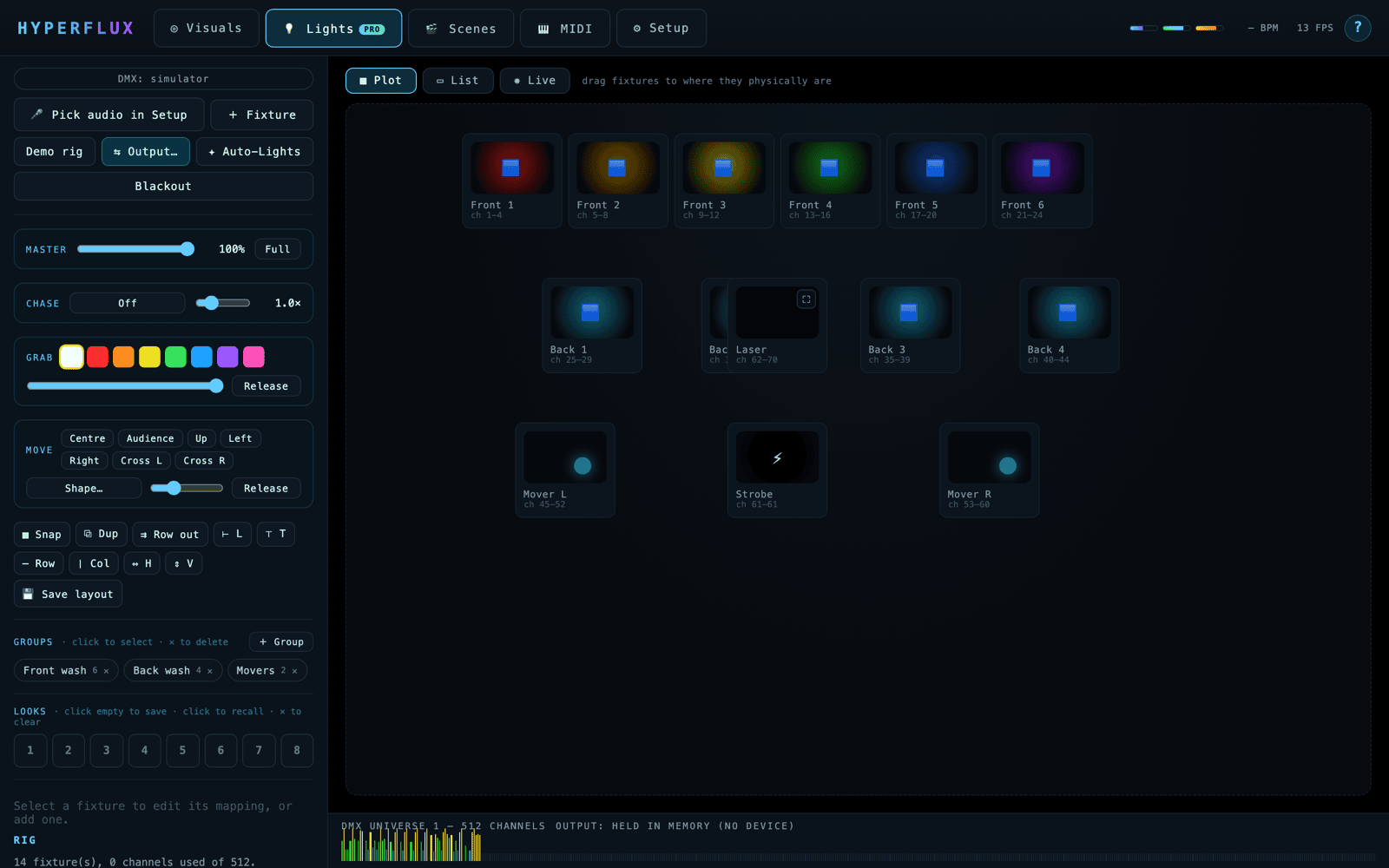
HYPERFLUX lighting console — spatial stage plot with the fixture rig lit up
Lighting console — patch your rig on a spatial stage, every fixture reacting to the stems.
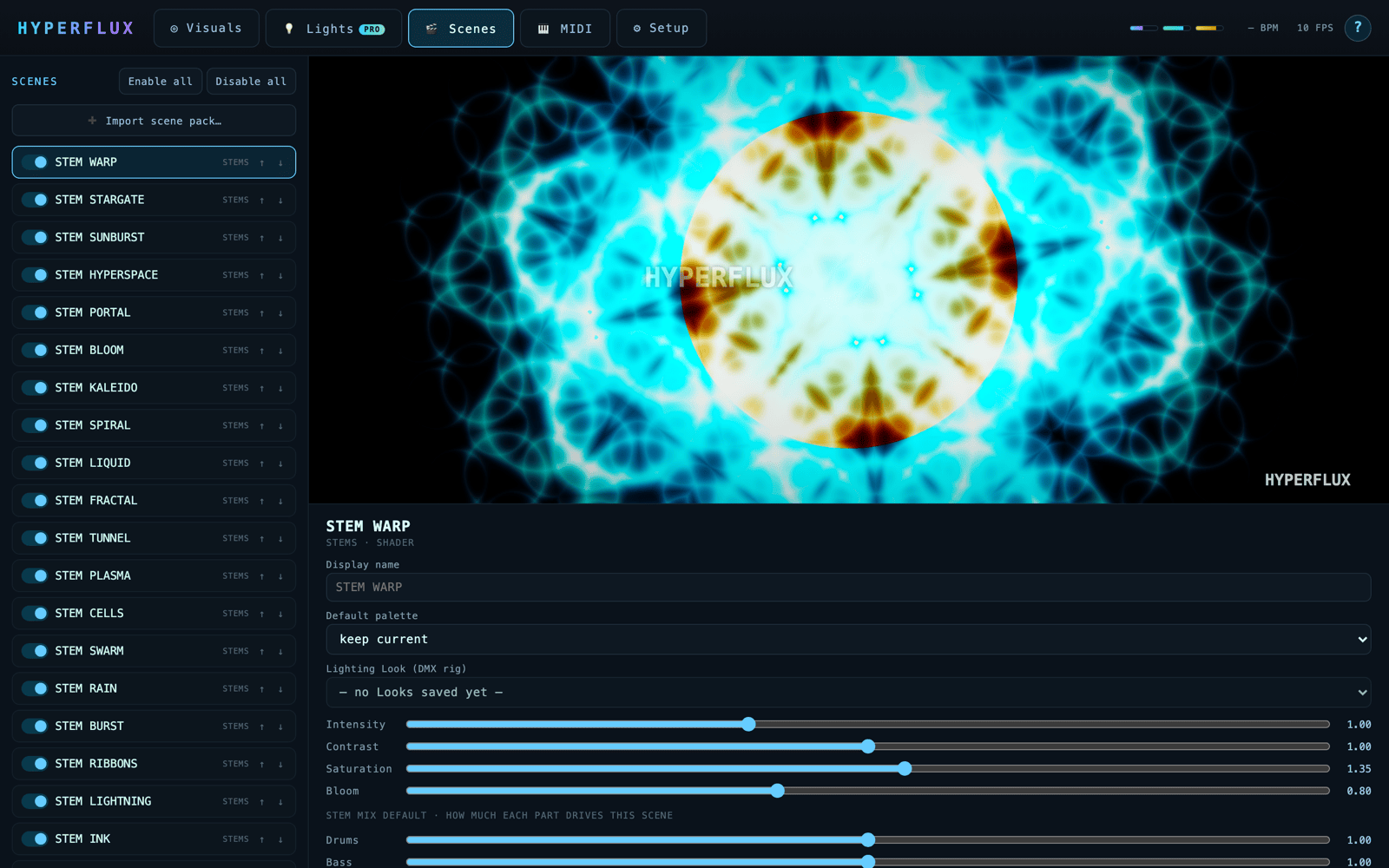
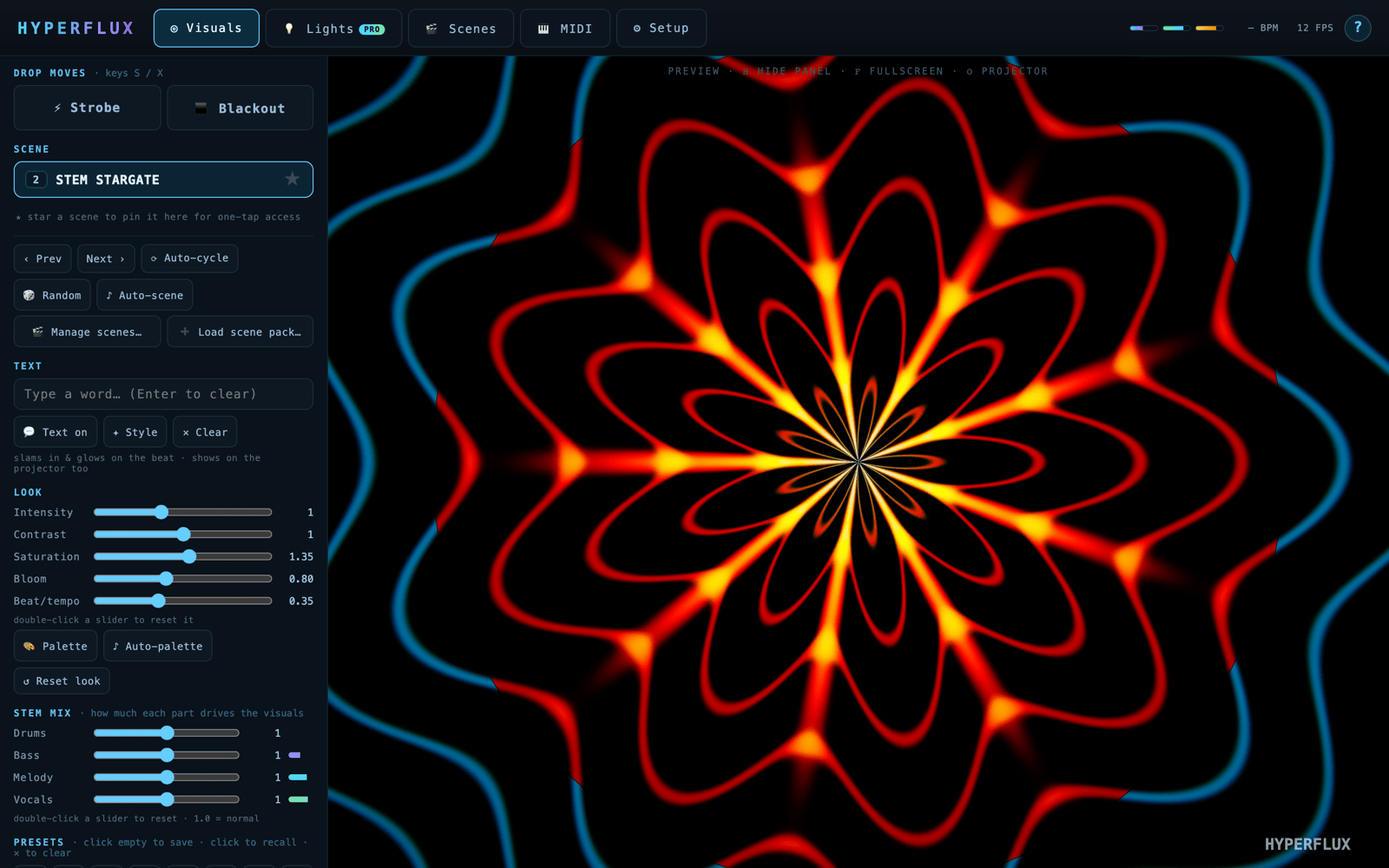
HYPERFLUX scene manager with a live kaleidoscopic scene preview
Scenes — 33 stem-reactive scenes, each with per-scene look + stem mix.
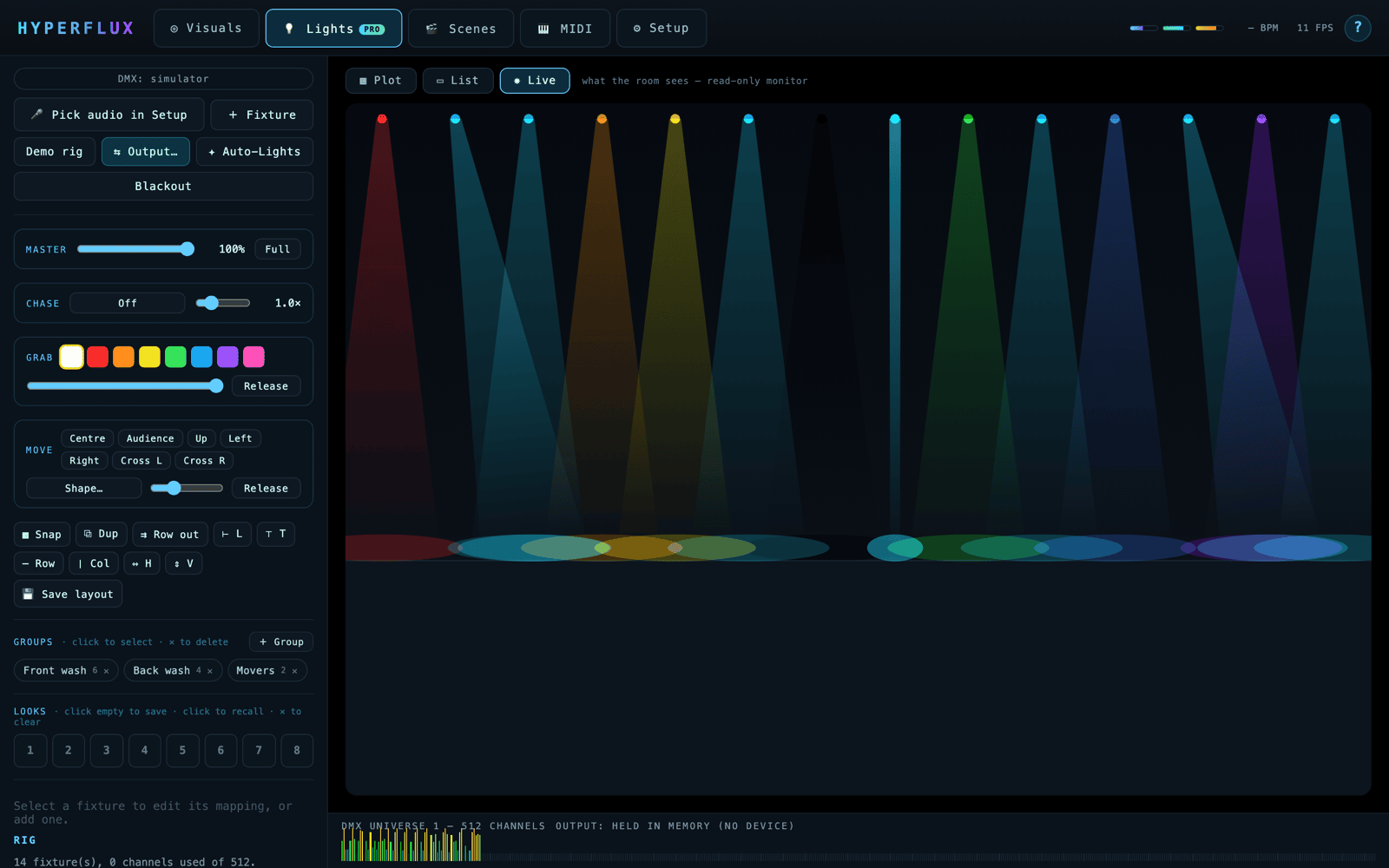
HYPERFLUX Live view — beams and washes rendered as the room sees them
Live monitor — what the room actually sees, rendered live.
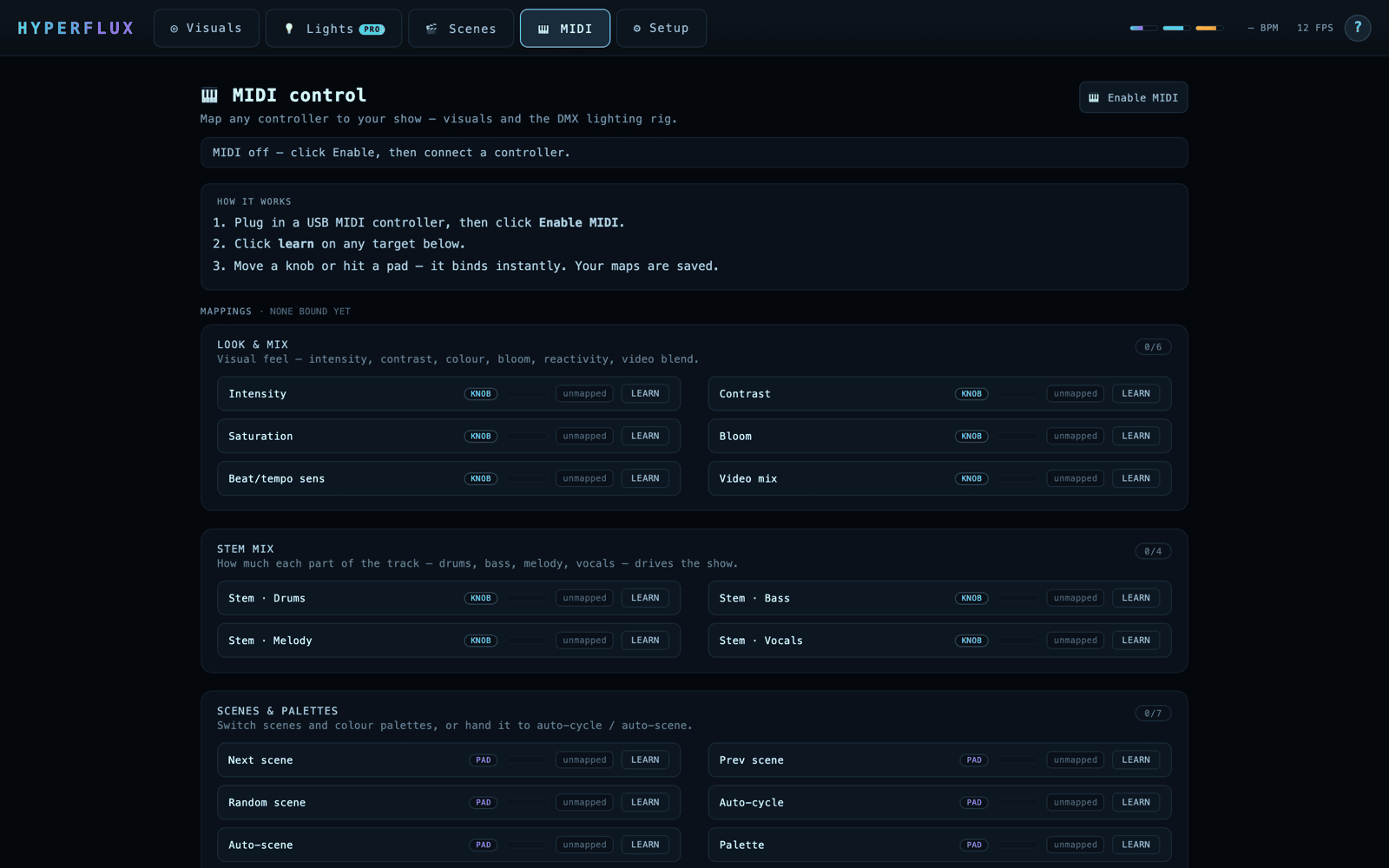
HYPERFLUX MIDI mapping page with grouped targets
MIDI mapping — bind any controller to visuals + lights.
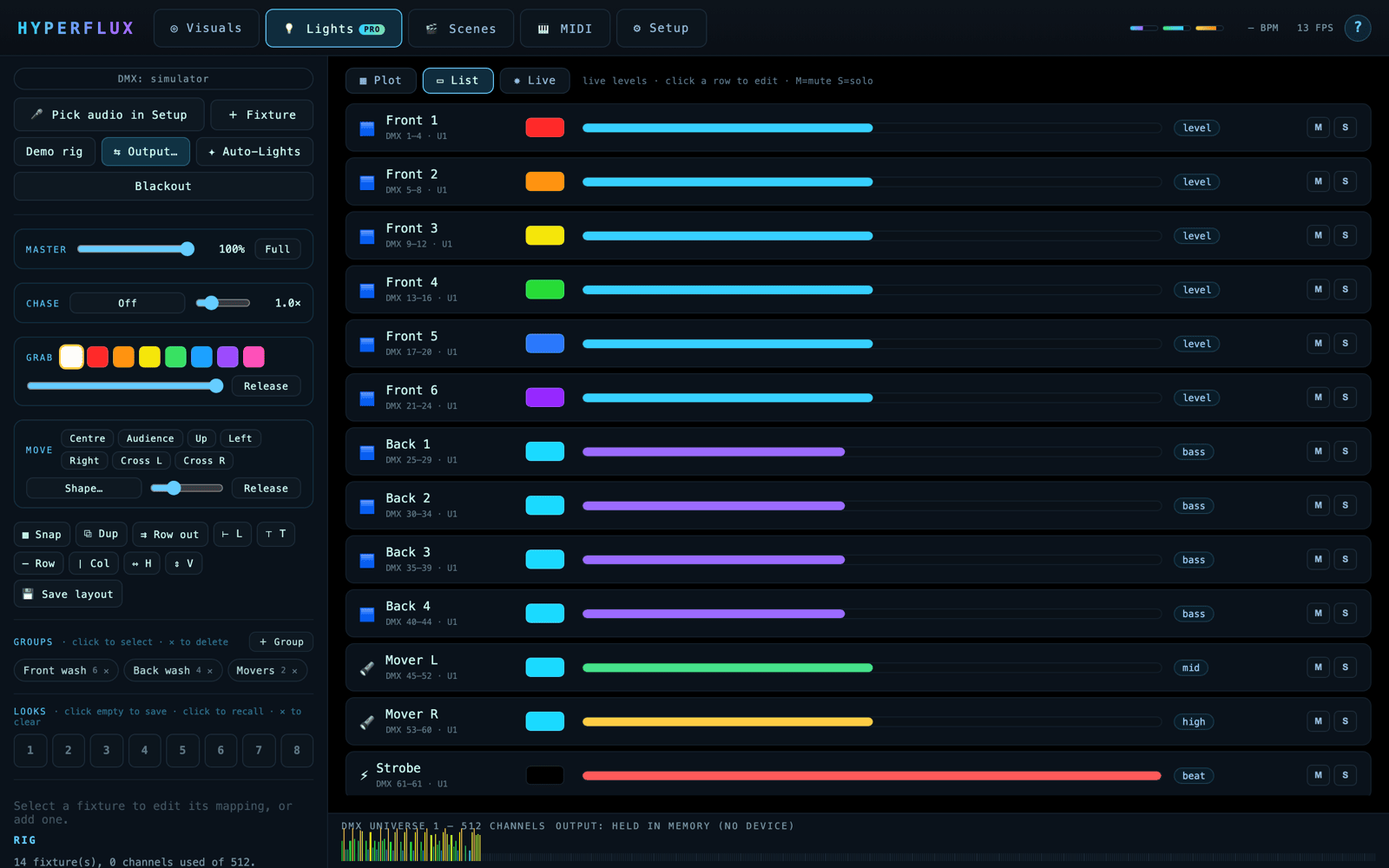
HYPERFLUX lighting mixer list view with level meters and mute/solo
Lighting mixer — live levels, mute/solo, the big-rig view.

Where it fits

HYPERFLUX isn't trying to be Resolume. It's the stem-reactive "DJ-in-a-box" — visuals that listen to the music properly, plus real lights, one app, one-time price.

ToolStem-reactiveLights / lasersPrice
HYPERFLUX✓ drums/bass/vox/melody✓ Art-Net/sACN + GDTFone-time
Resolume Arena— (level only)DMX out only€799 once
SYQEL (web)— (level only)$30–50 / month
rekordbox Video$149
SoundSwitch (lights)subscription

Prices as of research; competitors do more in their lane — HYPERFLUX wins on stem-level reactivity and bundling visuals + lights for one small price.

Try free, unlock when ready

Download the full app and run it free — every feature, watermarked. Like it? Unlock with a one-time key. No subscription, yours forever.

1 Download free
The whole app, macOS & Windows — runs in trial mode (watermarked), no sign-up.
⬇ Download free

↓ then, when you're ready — unlock with a key

Standard
$39 USD
one-time · lifetime updates
  • The full desktop app (macOS & Windows)
  • All 33 stem-reactive scenes + palettes
  • Video layer + clean projector output
  • Video recording (with audio)
  • MIDI control · preset slots · tap-tempo
  • Scene-pack import · runs offline · no tracking
  • DMX lighting console + simulator — design & preview your show
  • Output to real fixtures PRO
Unlock Standard
One-time payment · instant download · no subscription.
Compare every feature side by side →
Or play the scenes in your browser first — a quick feel for the visuals engine (the full app adds lighting + outputs).

Drive it live

  • Pick a scene with the number keys, or let it auto-cycle on the beat
  • Save whole looks to preset slots; recall them instantly
  • Tap-tempo or MIDI-map your controller to anything
  • Hold S to strobe, X to blackout
  • Projector window + F for fullscreen; Shift+R records
  • Patch DMX fixtures and they move to the same stems — preview it free

Your rig, sorted

  • Any DJ software — rekordbox, Serato, Traktor… route your mix in via a virtual audio cable
  • Projector / TV — clean second-window output, AirPlay or HDMI
  • Whole-venue lights — Art-Net / sACN over the network, or a USB-DMX dongle PRO
  • Your fixtures — stock library + GDTF import; movers, washes, lasers, strobes
  • Streaming — drop the web build in as an OBS source

Full lighting console →

Common questions

The short answers — full guides are in Help.

Is there a free trial?
Yes — the trial is the full app, every feature unlocked, with a small watermark on the output. Try everything before you buy; the watermark vanishes the moment you activate.
How do I get my DJ software's audio into it?
Route your DJ app's output through a free virtual audio cable (BlackHole on macOS, VB-CABLE on Windows) and pick it as HYPERFLUX's input. Step-by-step per OS in Help → Get your audio in.
What's the difference between Standard and Pro?
Standard ($39) is the full visuals app — and the DMX lighting console + simulator, so you can design & preview a whole light show. Pro ($79) sends it to real fixtures: Art-Net, sACN & USB-DMX output. Both one-time, lifetime updates.
How many computers can I use it on?
Up to 3 machines — e.g. laptop, studio and booth. Deactivate from the app to move your license to a new computer.
Subscription? Refunds?
No subscription — pay once, yours forever with lifetime updates. Because the trial lets you test every feature first, purchases are final; if something's wrong, email support and we'll sort it.
What do I need to run it?
A modern macOS or Windows computer with a WebGL2-capable GPU. Runs fully offline, no tracking. For lights: any Enttec-class USB-DMX adaptor or an Art-Net / sACN node.

Light up the room

Download it free and run the whole thing tonight — unlock with a key when you're ready. No sign-up, no subscription.